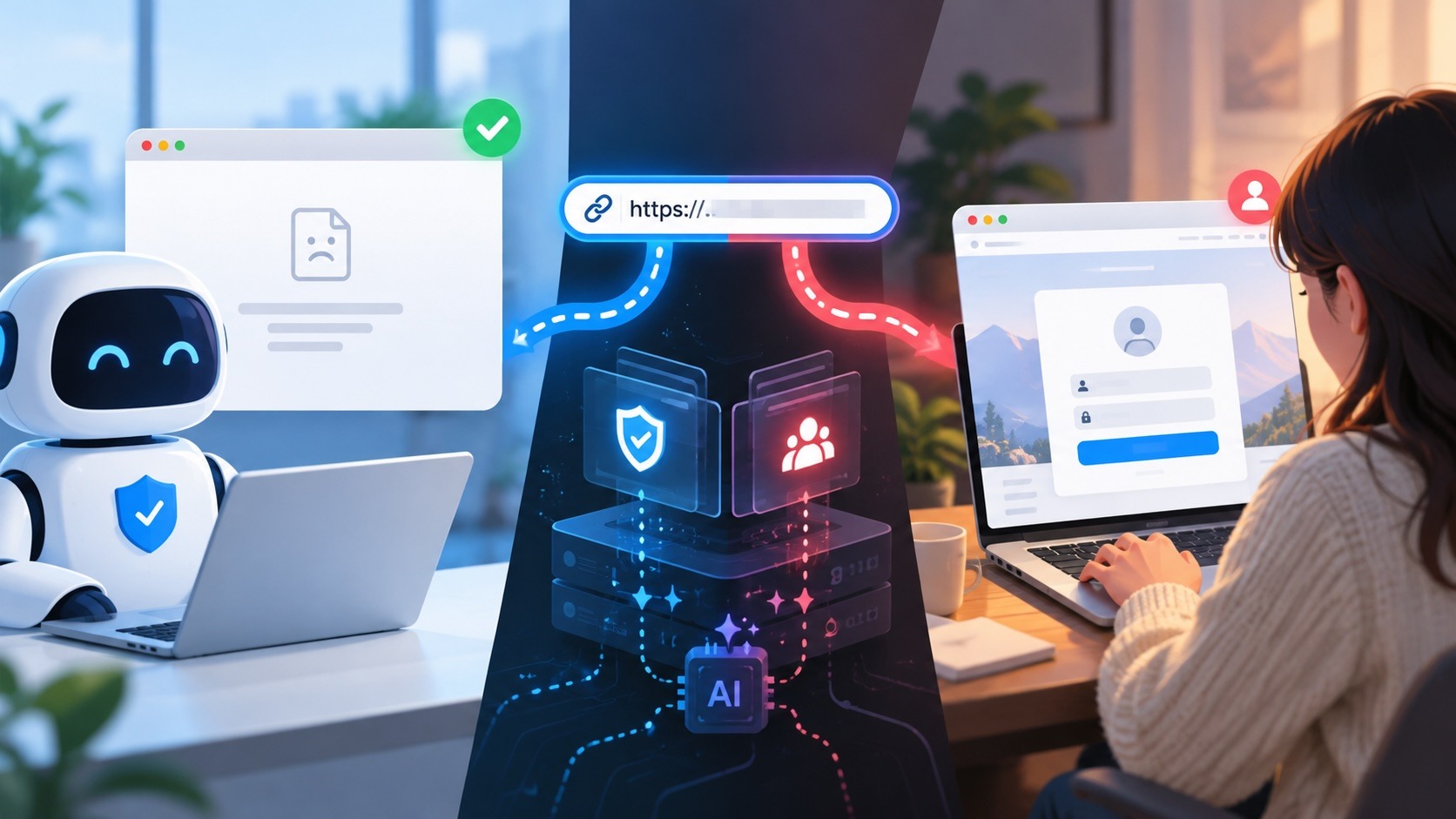
There is a piece of security advice so common that almost everyone can recite it: to spot a phishing email, look for spelling mistakes and bad grammar. It has been repeated in training decks, bank statements, and IT onboarding for over a decade. It was reasonable advice, once. It is now one of the most dangerous things you can teach someone.
Here is the problem. Modern phishing does not have typos. It does not have clumsy design or a blurry logo. Increasingly, it does not even come from a suspicious address. The scam that empties an account or takes over a company's ad manager in 2026 is clean, polished, and often indistinguishable from the real thing right up to the moment the damage is done. When you tell people to watch for spelling mistakes, you are handing them a metal detector and sending them to look for a threat made of plastic. Worse, you are teaching them that a well made page is a safe page, which is exactly the assumption every modern attacker is counting on.
This is a field guide to how convincing phishing has actually become, drawn from attacks we have documented over the past year. It is written for two audiences at once, because the same shift is hurting both: individuals who lose access to their bank, email, or crypto, and businesses whose employees hand over the keys to Google Workspace, Microsoft 365, or Meta Business without ever seeing anything that looked wrong.
Key takeaways
The "look for spelling mistakes" test assumes fakes look fake. Modern phishing pages are pixel-perfect copies with no errors to find.
Three forces killed the old advice: generative AI made flawless copy free, attackers learned to abuse real brands and real infrastructure, and scams moved into ads and search results that people already trust.
Every classic red flag (typos, bad design, a suspicious sender, a weird link, a missing MFA prompt) now has a real, documented workaround.
This hits individuals and businesses the same way, because both are asked to make the same impossible judgment: "does this look real?" The honest answer is that looking is no longer enough.
The durable defense is to stop judging a page or message by how it looks and start confirming what it actually is. That is a verification problem, not an attentiveness problem.
When typos actually told the truth
To understand why the advice failed, it helps to remember why it worked in the first place.
Ten years ago, most phishing was produced at volume by people who were not native speakers of the language they were writing in, using cheaply copied templates. The economics rewarded quantity over quality. A campaign that reached a million inboxes only needed a tiny fraction of people to fall for it, so there was no incentive to polish. The result was the phishing everyone remembers: the "your acount has been suspend," the stretched logo, the sender address that was clearly wrong. In that world, "look for the mistakes" was genuinely useful, because the mistakes were there and they were the cheapest thing for a defender to notice.
The advice was never really about spelling. It was a proxy. Typos were a visible stand-in for a deeper truth: this message was made carelessly by someone who does not represent the brand it claims to be. Spotting the typo was a shortcut to spotting the lie.
That shortcut only works if carelessness and fakery travel together. In 2026, they have been decoupled. The fakery is now made with enormous care.
Three things quietly killed the checklist
The typo went extinct
The single biggest change is that producing perfect, personalized, on-brand text now costs nothing. The grammatical errors that used to give phishing away were a symptom of cheap human labor. Generative tools removed that cost. A convincing email that once required a fluent writer can now be produced in seconds, in any language, matched to any brand's tone.
This is not theoretical. We have watched ChatGPT itself become one of the most impersonated brands in phishing, with attackers borrowing the exact voice and formatting people now associate with a trustworthy AI product. The tool that helps write clean phishing is also the brand being faked with it.
The call is coming from inside the brand
The second force is subtler and more important. Attackers stopped merely imitating trusted senders and started sending through them.
Consider the Robinhood "recent login" email we documented: the phishing message was delivered through Robinhood's own legitimate email system, so it passed every sender authentication check a suspicious recipient might rely on. Or the Meta business attack, where the phishing email genuinely comes from Meta. When the sender is real, "check who it is from" gives you a green light straight into the trap.
The same logic extends to trusted services. The fake Calendly invitations used to steal company credentials work precisely because Calendly is a normal, legitimate tool that email filters wave through. A recruiter sending a scheduling link is so ordinary that suspicion never engages.
The scam moved to where you already trust
The third force is location. Phishing no longer waits in your spam folder. It has moved into the two places people trust most: search results and ads.
When you search "download ChatGPT," a fake site is waiting at or near the top of the results. When you search for your bank, the top result might not be your bank. Fake ads promising "free TradingView Premium" lead directly to malware. A person who was taught to distrust email links has been given no reason to distrust the first Google result, and that is exactly the gap being exploited.
What flawless phishing actually looks like
Below are the four patterns that show up again and again in the attacks we track. Read them as case files. In every one, there was nothing to catch by looking.
Pattern one: the pixel-perfect fake login page
This is the workhorse of modern phishing. A page is built to be a flawless replica of a real login screen, copying the fonts, spacing, colors, and behavior exactly. There is no typo because there is no text the attacker had to write; they copied it. Recent examples we have covered span nearly every major platform people trust: the Meta blue-badge verification scam that takes over Facebook Pages, fake recruiters from Adobe, Netflix, and OpenAI stealing Google logins, and a fake Microsoft login served over hotel Wi-Fi. The TikTok version made the point plainly enough that we titled the piece for it: nothing looks off, and that is how the scam works.
The defense you were taught ("look at the page carefully") is defeated by design, because the page was built to survive exactly that inspection.
Pattern two: the message that really comes from a trusted source
Here the attacker does not spoof a brand, they borrow its real channels. The Bank of America "action needed" email, the LastPass phishing campaign targeting businesses, and the wave of invoice fraud and business email compromise all lean on legitimacy: a real logo, a plausible request, sometimes a genuinely compromised account doing the sending. "Verify the sender" fails because the sender verifies.
Pattern three: the scam that is the ad or the search result
The malvertising and SEO-poisoning pattern turns your own good habits against you. Instead of downloading software from a sketchy link in an email, the victim searches for it and installs the top result, which is a look-alike site that outranks the real download. A site that looks exactly like CNN asks you to download one file. A crypto wallet "hardware audit" email points to a page that looks official in every respect. Even the humble CAPTCHA has been weaponized: sometimes the CAPTCHA itself is the phish.
Pattern four: the attack that skips the "phishing email" entirely
The most advanced pattern removes the one thing people are trained to scrutinize. There may be no suspicious email at all. Attackers relay your real login and your real multi-factor prompt to the genuine service in real time, capturing the authenticated session rather than just the password. This is why phishing can bypass your password and MFA and why Microsoft 365 phishing can beat MFA outright. It is also why phishing can now reach business travelers with no phishing email involved, and why malicious browser extensions can steal enterprise logins that MFA was supposed to protect. For a business, the uncomfortable truth is that even a perfectly trained, MFA-enabled employee can be compromised without doing anything visibly wrong.
The red-flag graveyard
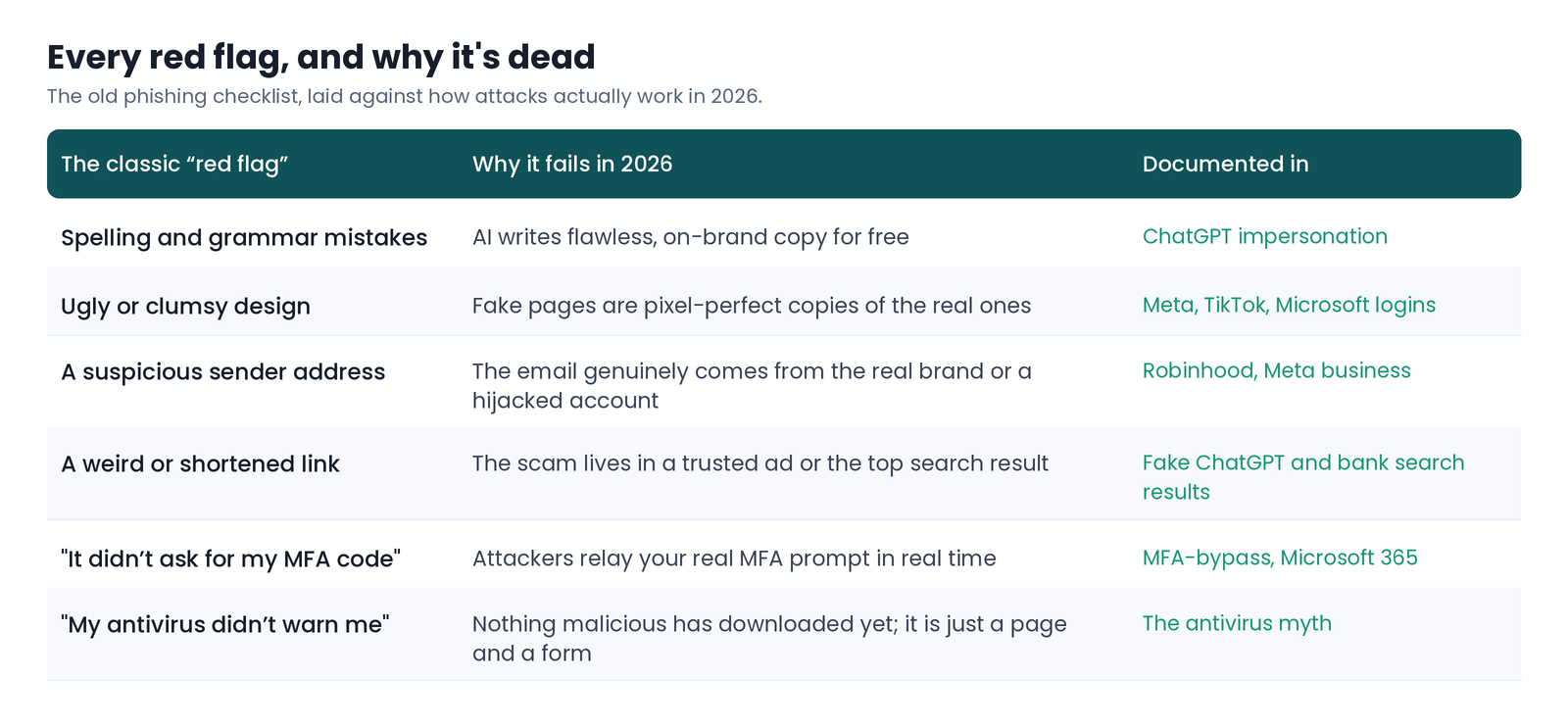
Notice the pattern in the last column. Every workaround exists because the old advice tests appearance, and appearance is the one thing an attacker can now perfectly control.
Same trap, two sets of victims
For an individual, the stakes are direct. A convincing fake login gives away the password to your email, and your email is the reset mechanism for everything else. A fake bank page or crypto "audit" costs money that is often unrecoverable. And the moment of decision is brutally short: you are busy, the message feels plausible, and the only reliable tell (the true identity of the page) is buried in an address bar you are not looking at, often on a phone where the full web address is hard to see at all.
For a business, the same failure multiplies. One employee entering credentials on a pixel-perfect Microsoft 365 or Google Workspace page can hand over single sign-on to an entire organization. A compromised Meta Business account becomes a platform for running more attacks. And because the modern versions bypass MFA and leave no obvious trace, your awareness training and your security stack can both report "all clear" while an account is being taken over. We have argued before that this is why training alone cannot carry the load and why security built around fear and vigilance is not working. You cannot train a person to out-stare a perfect copy.
Stop looking. Start verifying.
If "look for mistakes" is dead, what replaces it? The shift is from judging appearance to confirming identity. A page cannot fake what it actually is, only how it looks.
For individuals, a few habits hold up where the old checklist fails:
Do not log in through a link you were sent. Reach the site yourself, by typing the address or using a bookmark, and check your account there. This single habit neutralizes most of the patterns above at once.
Treat urgency and reward as bait, not as information. A message engineered to make you act fast is engineered to stop you from checking.
Use a password manager. It will refuse to autofill your password on a look-alike domain, which is a quiet, reliable signal that the page is not who it claims to be.
Prefer phishing-resistant sign-in (passkeys or a hardware security key) where you can, because these are bound to the real site and cannot be relayed.
For businesses, the same principle scales up: assume employees will eventually face a fake they cannot distinguish by eye, and put verification where the decision happens (in the browser, at the moment of the click) rather than relying on the human to notice. We wrote about why this means catching the lie, not just the malware, and why the browser has become the place this has to be solved.
How Haven helps
This is the gap Haven is built for. Haven is a browser extension that does not rely on a page looking suspicious, because modern fakes do not. Instead of judging appearance, it checks whether a page truly is who it claims to be, and warns you before you enter anything on an impersonated login or a look-alike site, no matter how polished the copy is or how you arrived. It checks links before you click, flags fake and look-alike pages, and pauses risky downloads on unverified sites.
To be clear about scope: Haven works in your browser. It flags the fake before you hand anything over. It is not antivirus, and it cannot undo credentials you have already typed on a fake site. What it does is make sure you rarely reach that point, by confirming identity at the moment appearance can no longer be trusted. It is free for individual use, and Haven for Business extends the same protection across every employee's browser.
The lesson underneath all of this is simple, and it is worth replacing the old advice with: you can no longer trust that a scam will look like a scam. Stop telling people to hunt for typos. Start giving them a way to confirm what a page actually is.
About Haven
Haven is a browser extension that helps you make safer trust decisions online, before a scam can cost you anything. It works at the moment you are about to click a link or enter your password, flagging fake and impersonated login pages, suspicious links, and look-alike sites. Rather than only checking a page against a list of known-bad sites, Haven analyzes the actual page in front of you, so it can catch brand-new and convincing fakes that other tools miss.
Haven is free for individual use. For teams, Haven for Business extends this browser-level protection across every employee. Haven is operated by MirrorTab Corp.