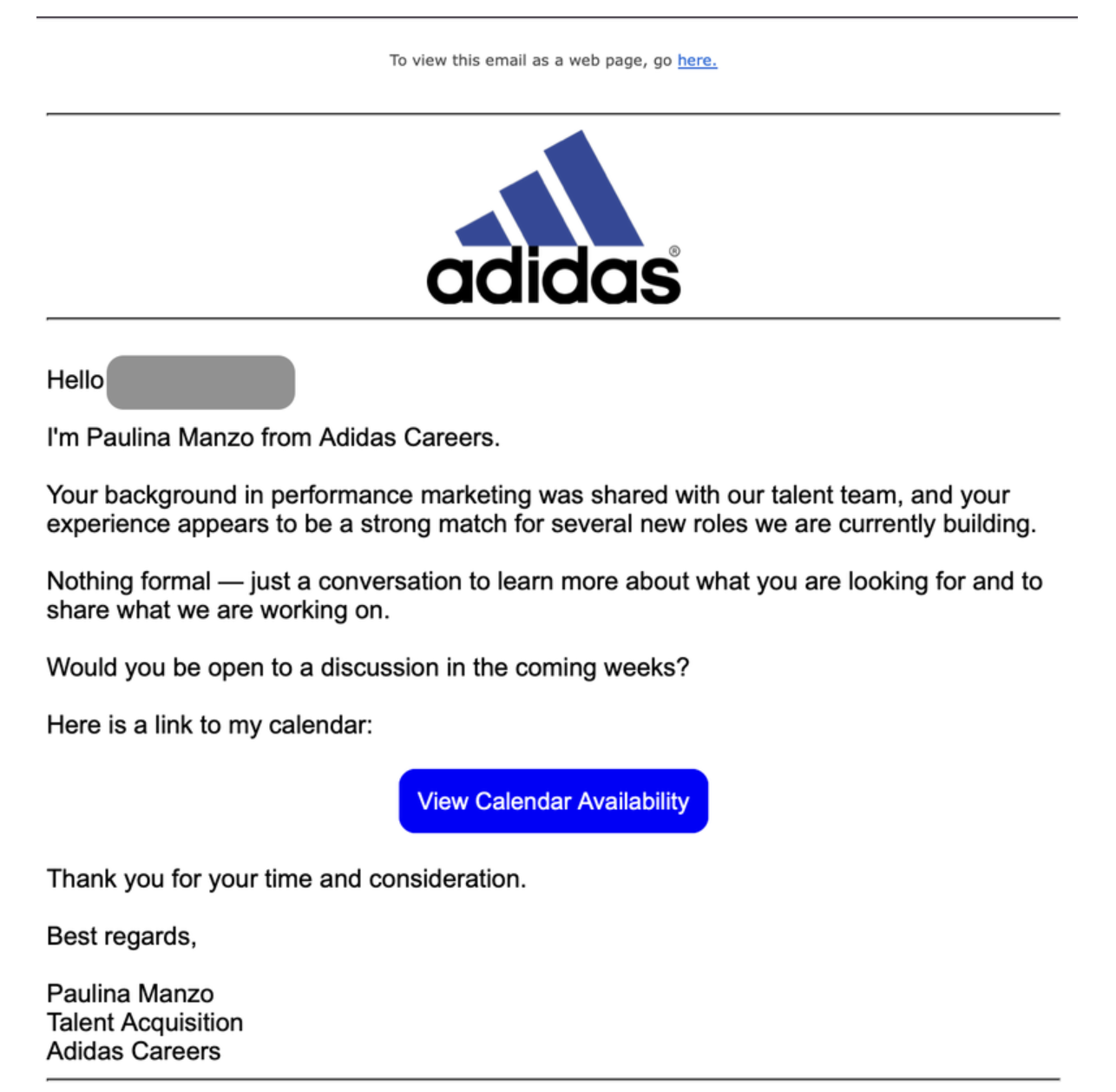
You get an email from a recruiter at a brand you admire. The role fits. The recruiter is real, with a name and photo you can look up. You click to schedule the interview, and you are asked to sign in with Google to continue. The sign-in window looks exactly like Google's. You enter your password. And you have just handed your account to an attacker.
That is a live phishing campaign, and it works because every visible signal is designed to look right. The most important lesson in it is simple: a login window that looks like Google is no longer proof that it is Google.
What's happening
A phishing operation is impersonating more than 30 well-known brands, including Adobe, Netflix, Coca-Cola, OpenAI, and Adidas, in fake job interviews aimed at marketing professionals, according to research reported by BleepingComputer. The goal is to steal Google account credentials.
The emails pose as recruiters offering marketing roles, and to build trust the attackers use the real names and photos of actual recruiters at the companies they impersonate. The links route victims through a chain of legitimate cloud services before landing on a lookalike page such as a brand-hiring domain. On that page, clicking "Continue with Google" opens what appears to be a normal Google sign-in popup.
It is not. The window is a browser-in-the-browser attack, which means the popup is just HTML and CSS drawn inside the phishing page to imitate a real browser sign-in window. It can reproduce the Google logo, the address bar, the buttons, and the layout closely enough that nothing looks off. When you type your password into it, the credentials go straight to the attacker.
source: Sergiu George
Why the usual advice doesn't help here
For years the guidance was to slow down and check for the obvious tells. Look at the sender. Check the logo. Read for typos. Hover over the link. This campaign defeats almost all of it.
The recruiter is a real person, so a quick search confirms rather than contradicts the story. The redirect chain passes through genuine cloud platforms, so the early links look trustworthy. The final popup is a pixel-level imitation of Google, so there is no blurry logo or clumsy layout to catch. Even the instinct to check the address bar can fail, because the fake window can draw its own address bar showing a convincing URL. The one thing that has not changed is the moment of risk itself: you are about to enter your Google password, and everything is pushing you to do it quickly.
The uncomfortable truth is that a careful, security-aware person can still fall for this. It is not a failure of attention. It is that the attack has removed the visual cues attention relies on.
How Haven helps
Haven is a browser-security companion that focuses on that exact moment, when you are about to sign in. Rather than asking you to spot a fake by eye, Haven is designed to recognize when a login page is not the real thing and tell you before you enter your password.
In a case like this, the fake Google sign-in is the whole attack. Because Haven evaluates the actual page and where the interaction really leads, not just how the window looks, it is built to catch a fake Google login page that a person cannot tell apart from the real one. A convincing popup, a trusted brand name, and a real recruiter's photo are exactly the kind of legitimate-looking cover that fools people and that Haven is meant to see through.
The point is not to make you anxious about every login. It is to give you clear guidance at the one moment that matters, so you can act with confidence instead of second-guessing. No tool can promise to stop every attack, and we will not claim that. What Haven offers is help where you are most exposed, which is the decision to trust a sign-in page.
How to protect yourself right now
You do not have to become a security expert to avoid this. A few habits make a real difference.
Be cautious with unexpected job offers that move you toward a login, especially when the message creates urgency about scheduling. Real recruiters rarely need your Google password to book a call. Treat any link in the message as a suspicious link until proven otherwise, and if you want to protect against phishing, ask "is this link safe?" before you click rather than after. When you are asked to sign in, go to the service directly by typing the address yourself or using a saved bookmark, rather than following a link from the message. Use a password manager, since it will refuse to autofill your Google password on a lookalike domain, which is a quiet but powerful signal that the page is fake. Turn on a passkey or a phishing-resistant second factor for your Google account, so a stolen password alone is not enough. And if a sign-in window appears inside another page rather than as your browser's own window, treat it with suspicion.
Then add help for the moment itself. The strength of this campaign is that it looks completely legitimate, and looking legitimate is no longer proof of safety. Real phishing protection now means having something that can check the page for you, closer to a scam website checker than a checklist, and a browser-security layer that can recognize a fake Google login page gives you that second opinion exactly when you need one.
The scam is clever, but its power comes from appearances, a real brand, a real recruiter, and a perfect-looking sign-in. Haven is built to see past the appearance and tell you when a login page is not what it claims to be.
Haven is free for individual use and is operated by MirrorTab, Inc.
FAQs
What is a fake Google login page?
A fake Google login page is a phishing page designed to look exactly like Google's sign-in screen so that you enter your email and password, which are then sent to an attacker instead of Google. In this campaign, the fake page appears after you click "Continue with Google" on a lookalike job-interview site, and it is convincing enough that most people cannot tell it apart from the real thing.
What is a browser-in-the-browser (BitB) attack?
A browser-in-the-browser attack is a technique where a phishing page draws a fake browser popup window using ordinary web code (HTML and CSS). The fake window can imitate a real Google or Microsoft sign-in popup, including the logo, buttons, and even an address bar showing a legitimate-looking URL. Because it is rendered inside the page rather than being a real window, the usual visual checks can fail.
How does the job interview phishing scam work?
The scam starts with an email posing as a recruiter from a well-known brand offering a marketing role, often using a real recruiter's name and photo. Links route you through legitimate cloud services to a lookalike hiring page. When you try to schedule the interview, you are asked to sign in with Google, and a fake Google login page captures your credentials.
How can I tell if a Google login page is real?
Instead of judging by appearance, go to the service directly by typing the address or using a bookmark rather than clicking a link in a message. Watch whether your password manager offers to autofill, since it will not autofill on a fake domain. Be suspicious of any sign-in window that appears inside another web page. And use a passkey or phishing-resistant two-factor authentication so a stolen password is not enough on its own. When you are unsure about a link, use Haven's free link checker tool to see if the site is real or not.
Why is this scam so hard to spot?
It is hard to spot because it removes the usual warning signs. The recruiter is a real person, the early links pass through genuine cloud platforms, and the fake Google login page is a pixel-accurate copy, sometimes with its own fake address bar. A careful, security-aware person can still be fooled, because the attack imitates exactly what a legitimate sign-in looks like.
How does Haven help stop fake login pages?
Haven is a browser-security companion designed to recognize when a login page is not the real thing and warn you before you enter your password. It is a form of phishing protection that works at the moment of risk: because it evaluates the actual page and where the interaction leads rather than how it looks, it is built to catch a fake Google login page that a person cannot tell apart from the real one. No tool can stop every attack, but Haven adds a second opinion at the moment you decide to sign in.
Is Haven free?
Haven is free for individual use. Haven is operated by MirrorTab, Inc.