Key takeaways
Malwarebytes Browser Guard is a solid, free browser extension for blocking known scam and malicious sites, ads, and trackers.
It is not a full antivirus and does not protect against phishing that arrives by email.
It relies on blocklists of known threats, so brand-new phishing pages can slip through until they are flagged.
Haven takes a known-safe-pattern approach and focuses on catching fake and impersonated login pages, and is free for individual use.
The two tools cover different gaps, so many people run both. Browser Guard blocks known-bad sites and ads; Haven flags fake logins the moment you are about to enter credentials.
Short answer: it depends on what you're using it to protect against. Malwarebytes Browser Guard is a solid tool for what it's built to do. Whether it's "enough" really comes down to what kind of threats you're most worried about, and what else you already have running.
Here's a straight breakdown, no scare tactics, no trashing a tool that plenty of people rely on.
What Malwarebytes Browser Guard actually does
Browser Guard is a free extension focused on browser-level protection: it blocks ads and trackers, flags known scam and malicious sites, and includes cryptominer blocking to stop sites from using your device to mine cryptocurrency in the background. It's built as a lightweight layer on top of whatever antivirus or security setup you already have, not a full replacement for one.
Communities like r/browsers and r/Malwarebytes generally describe it as a decent, low-friction way to catch obviously malicious sites before they load. It's a reasonable default for someone who wants basic protection without configuring anything.
Where the "is it enough" question actually comes from
The question shows up so often because Browser Guard is doing one specific job, and people are often hoping it covers more ground than that. A few things worth knowing:
It's not an antivirus. It protects your browser, not your whole device. If something gets downloaded and run outside the browser, Browser Guard isn't the layer that catches it.
It's focused on sites and ads, not email. Phishing doesn't only arrive as a malicious website, it often starts as a convincing email that leads you there. Browser Guard's protection kicks in at the browsing stage, not the inbox stage.
Ad-blocking depth varies by comparison. Some users pair it with a dedicated ad blocker if that's their main priority, simply because Browser Guard is optimized more for scam and malware sites than for stripping every ad and tracker.
None of that makes it a bad tool. It just means "is it enough" really depends on whether browser-level, site-blocking protection is the full extent of what you need, or one piece of a bigger picture.
Where Haven takes a different approach
Haven is built around a different core idea. Instead of relying only on a blocklist of known-bad sites, Haven checks whether a site or link fits a known-safe pattern rather than only checking it against a list of known threats. That matters most for brand-new phishing pages, which are often too new to appear on any blocklist yet.
That difference shows up across a few capabilities Browser Guard doesn't combine in one place:
Real-time link scanning. Haven checks links as you encounter them, so the "is this link safe?" question gets answered before you click, not only once a page has loaded.
Website and login-page verification. Haven verifies whether a site is what it claims to be and spots phishing signals, which helps catch impersonation and fake login pages, the kind of convincing lookalikes that traditional, list-based tools often miss.
Email phishing analysis. Haven's AI also looks at email, the point where a lot of scams actually start, analyzing factors like sender consistency, link destinations, and suspicious requests to flag phishing before a malicious link is ever clicked.
A few honest specifics:
Haven is free for individual use. No trial period, no feature paywall for personal protection.
Haven doesn't block pages for you. Instead of interrupting your browsing with a hard stop, Haven tells you whether a site or link looks safe so you can make the call yourself, without the back-and-forth of overriding a block every time it gets something wrong.
Link, site, and email protection are purpose-built capabilities that work together, not one feature doing double duty.
Haven is not an ad blocker, tracker blocker, or cryptominer blocker. If those are your priority, a tool like Browser Guard still does that job, which is part of why the two can sit side by side.
Haven currently holds a 4.8-star rating on the Chrome Web Store, if you want a third-party read before installing anything.
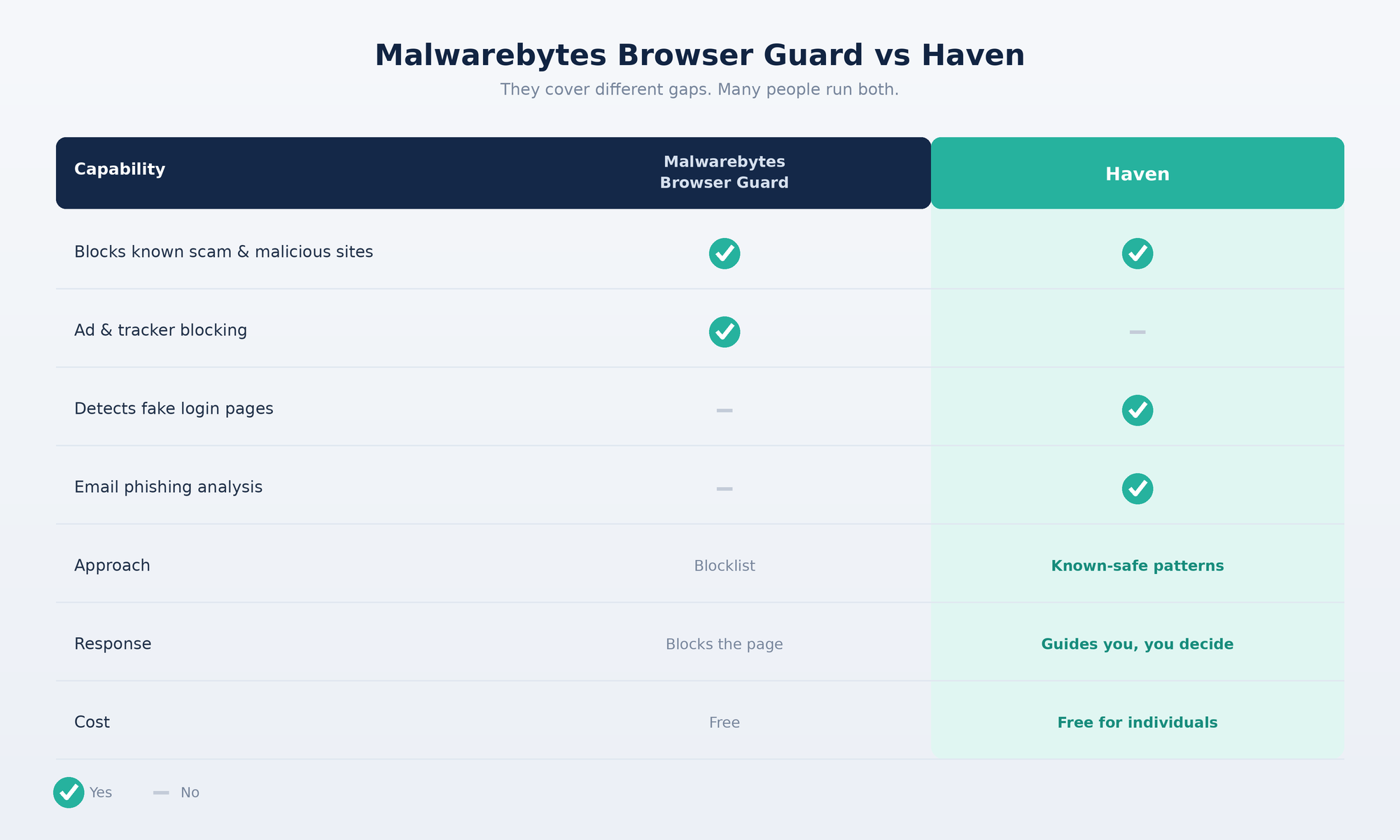
So, is Malwarebytes Browser Guard enough?
If your main concern is browsing into an obviously malicious or scam site, Browser Guard does a reasonable job at that specific task, and plenty of people are satisfied stopping there. If you're also worried about phishing that starts in your inbox, or you want protection based on recognizing safe patterns rather than only matching against known threats, that's a gap worth covering separately.
The two aren't really competing for the same job. It's less "which one is better" and more "which parts of the problem do you actually want covered."
FAQs
Is Malwarebytes Browser Guard enough on its own?
It depends on what you're protecting against. Browser Guard is a solid layer for blocking known scam and malicious sites, ads, and trackers at the browser level. It's not a full antivirus and it doesn't cover phishing that arrives by email, so whether it's "enough" comes down to whether browser-level site blocking is the only protection you need.
Does Malwarebytes Browser Guard protect against phishing emails?
No. Browser Guard operates at the browsing stage, checking sites and links once you're already navigating. It doesn't scan or flag phishing emails before you click a link inside them, since email protection is a separate category of tool.
Is Malwarebytes Browser Guard the same as an antivirus?
No. Browser Guard protects the browser specifically, blocking scam sites, trackers, and cryptominers as you browse. A full antivirus scans files and programs on the entire device, including things downloaded and run outside the browser, which Browser Guard doesn't cover.
Which is better for phishing protection, Malwarebytes Browser Guard or Haven?
They protect against different things. Malwarebytes Browser Guard is strong at blocking sites already known to be malicious, along with ads and trackers. Haven is built to catch fake and impersonated login pages, including brand-new ones a blocklist has not seen yet, and it also analyzes email for phishing. For fake-login and credential-theft protection specifically, Haven covers a gap Browser Guard does not. Many people run both.
Does Haven do something Malwarebytes Browser Guard doesn't?
Yes. Haven detects fake and impersonated login pages and analyzes email for phishing signals, which Browser Guard does not do. Haven also uses a known-safe-pattern approach rather than only matching against a blocklist, so it can flag newly created phishing pages. Browser Guard, in turn, does ad and tracker blocking that Haven does not, which is why the two work well together.
What's the difference between a blocklist and a known-safe-pattern approach to browser security?
A blocklist checks sites against a list of known-bad pages, which means brand-new phishing sites can slip through until they're added to the list. Haven checks whether a site matches known-safe patterns instead, which can catch newly created phishing pages a blocklist hasn't seen yet.
Does Haven block websites automatically?
No. Haven tells you whether a site or link looks safe rather than blocking it outright. The browsing decision stays with the user instead of being interrupted by a hard stop that then needs to be manually overridden.
Can Haven catch fake login pages?
Haven verifies whether a site is what it claims to be and looks for phishing signals, which helps it flag fake login pages and impersonation that list-based tools often miss. It shares its read with you at the moment you're deciding whether to sign in.
Is Haven free to use?
Yes, Haven is completely free for individual use, with no trial period or feature paywall on personal protection.
Can I use Haven alongside Malwarebytes Browser Guard?
Yes. The two tools cover different parts of the problem, Browser Guard focuses on browser-level site and ad blocking, while Haven adds a whitelist-based safety check plus AI-powered email phishing protection, so running both isn't redundant.