Most payment fraud does not look like fraud. It looks like a Tuesday email.
Recently, someone used my name to try to get our finance team to pay a fake invoice.
The message looked like it came from me. It asked our finance team to pay an invoice by ACH that same day, with a statement attached that looked like every other statement we get and a short, slightly urgent note. Nothing about it was dramatic. That is exactly what made it work.
We build browser security for a living, and it still landed in our inbox. I am not writing this because anyone was careless. I am writing it because these attempts reach everyone now, including teams that think about this problem all day, and because the old tells we were all taught to watch for are mostly gone.
For any business, the math is unforgiving. A single approved transfer can be very hard to get back. So here is how this kind of fraud actually works, what any team can do to slow it down, and where a tool like Haven does and does not help.
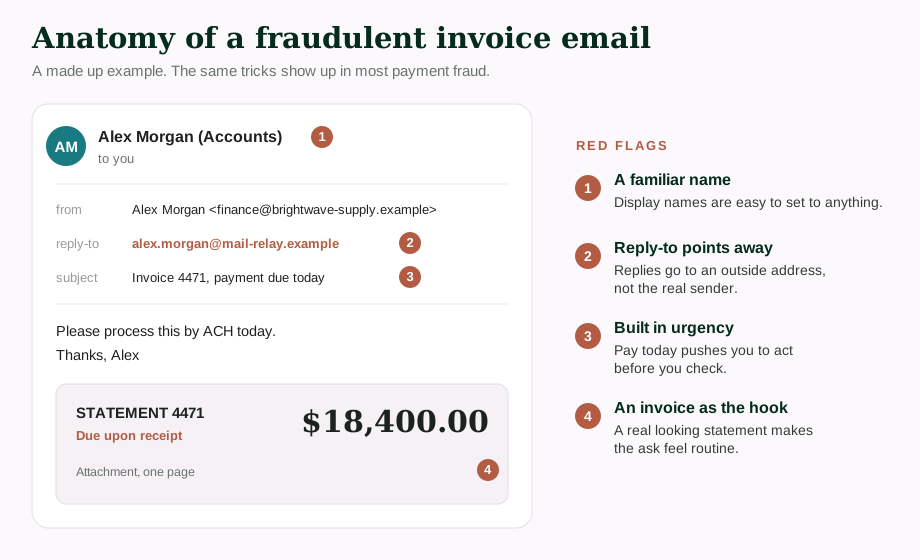
A made up example that mirrors what we saw. No real names, addresses, or amounts.
Looking legitimate is not the same as being legitimate
The old advice for spotting a scam was to look for the obvious tells: clumsy grammar, a strange logo, a clearly fake address. Those tells are mostly gone. The people running these schemes can copy a real invoice layout, use a real person's name, and reference a real project. When every visible cue looks right, "it looked legitimate" stops being useful evidence. That is why a careful person can still get caught.
Keep your business safe from online threats
Haven for Business protects every employee from phishing, fake sites, and browser-based attacks.
How this kind of attack actually works
nvoice and payment fraud tends to lean on a few moves, often stacked together.
Name impersonation. The display name shown in your inbox can be set to anything. It might read as your CEO or a known vendor, even though the underlying address has nothing to do with them. Most email apps show the friendly name first, so that is what people trust.
A reply-to that points somewhere else. This is the quiet one. A message can appear to come from an internal or familiar address, while the reply-to field is set to an outside account the attacker controls. If you hit reply, your response and any details you share go to them, not to the person you think you are talking to. The two addresses not matching is one of the clearest signs something is wrong, and also one of the easiest to miss, because you have to go looking for it.
Plausible urgency. "Due upon receipt." "Pay today." "Past due." Urgency is not a side detail here, it is the tool. It is meant to move you from checking to doing before you have time to ask a second person.
A pretext that fits your work. A statement, a past due balance, a request to update bank details for an existing vendor. The story is built to match something your team really does, so the request feels routine instead of strange.
Sometimes, a link. Many of these messages also push you somewhere: click to view the invoice, log in to see the account, update the payment details here. That link can lead to a page built to look like a real login or a real payment portal.
What you can do about it
The good news is that you do not need to catch every clever detail. A few habits stop most of these.
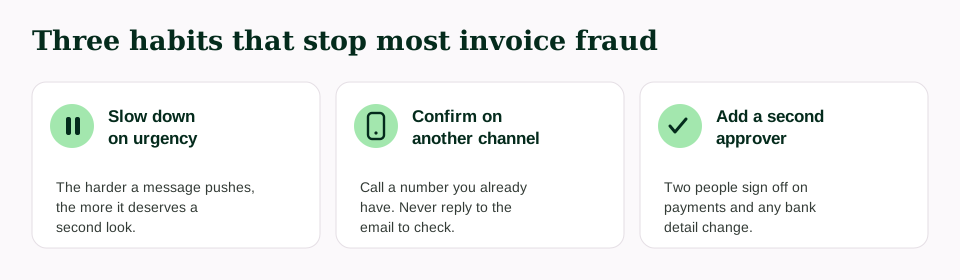
Treat urgency as a reason to slow down, not speed up. The harder a message pushes you to act now, the more it is worth a second look.
Read the actual address, not just the name. Expand the sender and check the real email address and the reply-to. If the reply-to points to an outside or unfamiliar domain, stop there.
Verify money moves on a second channel. For any payment, and especially any change to a vendor's bank details, confirm it using a phone number or contact you already have, not by replying to the email. A thirty second call prevents most invoice fraud.
Require a second set of eyes. A simple rule that payments over a set amount, and all bank-detail changes, need a second approver removes the single point of failure the attacker is counting on.
Lean on your email provider's signals. Authentication checks and external-sender warnings will not catch everything, but they raise the cost of impersonation. Make sure they are switched on and that your team knows what the warnings mean.
When a message sends you to a link, check the page before you enter anything. This is the moment where a spoofed login or payment page does its work, and it is the moment most worth a pause.
Where Haven fits
Haven's job starts at the browser. The moment one of these messages sends someone to a link, a login screen, or a payment page, that is the moment of risk, and it is where Haven works. Haven checks links in real time and helps you see whether the page in front of you is what it claims to be, so you can catch a suspicious or spoofed page before you enter a password, approve a transfer, or hand over bank details. It is designed to add a calm, clear check at the exact point where a convincing page is trying to earn your trust.
Haven is one layer, not the whole answer. Good process and a healthy pause do the heavy lifting in the inbox. Haven backs you up at the browser, where the click actually happens. At that point it checks the things that are easy to miss in a hurry: whether the web address matches the real site or is a close look-alike, whether a page is posing as a login or payment screen it should not be, and whether a link carries the markings of a known phishing pattern. If something does not line up, Haven gives you a plain heads up before you enter anything.
Haven is free for individual use. If a page ever makes you hesitate, that hesitation is worth listening to, and Haven is built to help you act on it.
FAQs
Does Haven read our email?
No. Haven does not read your email content.
Does Haven track our browsing history?
No. Haven is designed to help at the moment of risk without tracking where your people browse.
What does Haven actually do?
Haven checks links in real time, helps flag phishing and suspicious pages, and helps confirm whether a site is what it claims to be, all inside the browser and in plain language.
Is Haven free for our business?
Haven is free for individual use, so anyone can install it and protect their own browser at no cost. Business pricing and packaging are handled separately. If you want to roll Haven out across a team, reach out through starthaven.com.
Is Haven a replacement for our email security or staff training?
No, and it is not meant to be. Haven is one layer that adds a check at the browser, where the click actually happens. It works alongside good payment process, email filtering, and awareness, rather than replacing them.