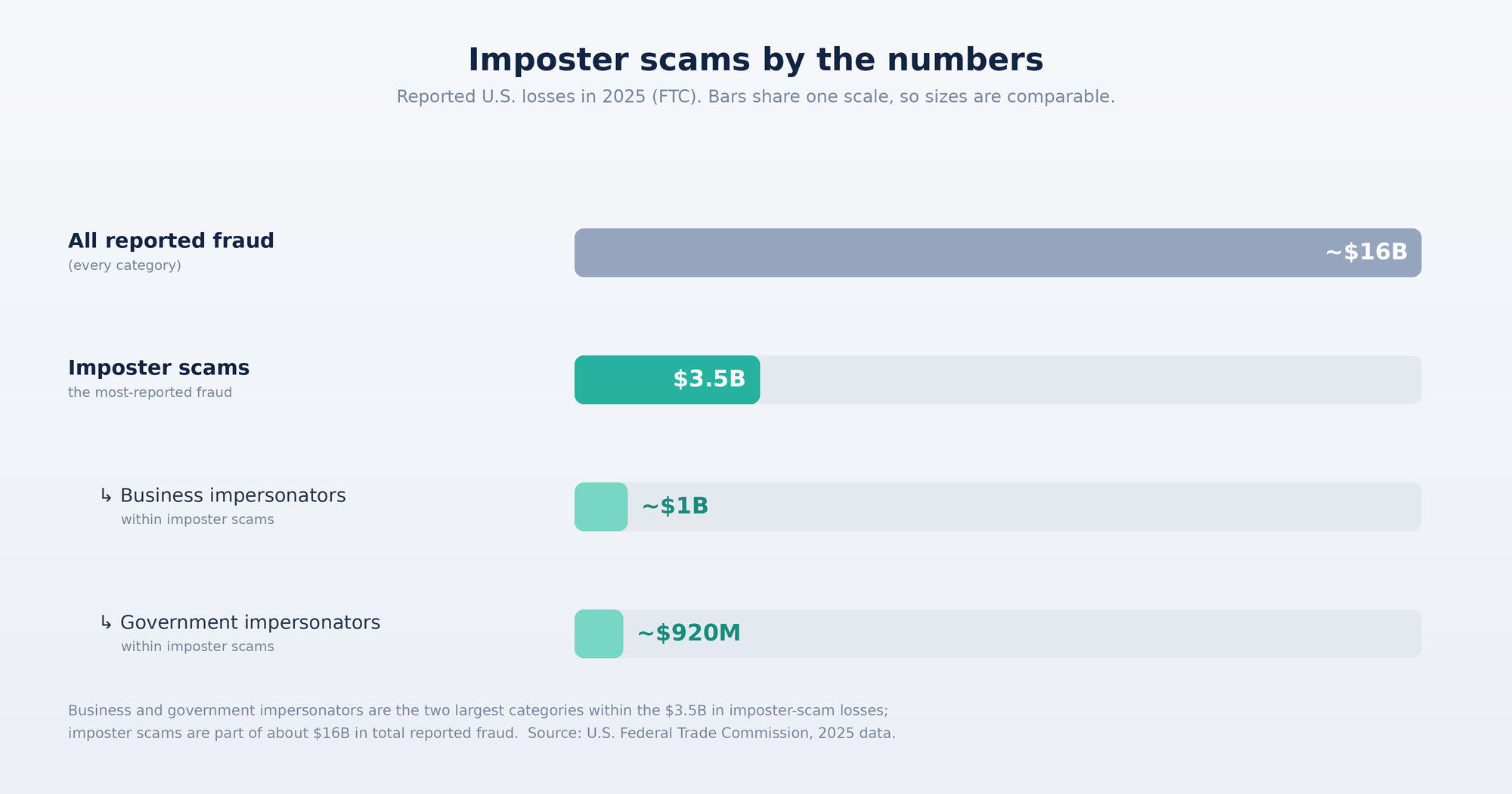
People reported losing $3.5 billion to imposter scams in 2025, and it is now the most-reported fraud in the country, according to new data from the Federal Trade Commission.
The numbers at a glance
$3.5 billion reported lost to imposter scams in 2025, up nearly three times since 2020.
The most-reported fraud of the year, about one in three fraud reports.
Nearly $1 billion lost to business impersonators, with bank impersonators the costliest.
About $920 million lost to government impersonators.
About $16 billion lost to all types of fraud in 2025, a record, and up roughly 25 percent from 2024.That is not a story about careless people. It is a story about how convincing impersonation has become. The good news is that a few habits, plus the right help at the right moment, go a long way. Here is what is driving the losses and how to protect against imposter scams, especially the ones that reach you online.
What is driving the losses
An imposter scam is one where someone pretends to be a person or organization you trust, a bank, a government agency, a well-known company, to get your money or your information. The FTC points to a telling pattern behind the costliest cases: many start with a fake security alert, often posing as your bank. You are told your account is at risk and pressured to move money to "protect" it. The urgency is the trap.
Why imposter scams are so convincing now
The old warning signs have faded. A scam message today can carry a real logo, a legitimate-looking sender, clean writing, and a link that leads to a page that looks exactly like the real thing. The impersonation is the whole point, and looking legitimate is no longer proof that something is legitimate.
These scams reach people through many channels: text, phone calls, social media, search results, and email. The ones that play out online usually share a common shape. A message creates urgency, it points you to a website or a login page, and at that page you are asked to enter a password, a code, or payment details. By the time you are typing, the decision to trust has already been made. That decision, made in your browser or your inbox, is where an online imposter scam succeeds or fails.
How Haven helps you spot them
Haven is a free browser-security companion built for exactly that moment, when you are about to click, sign in, or trust something that looks real. Instead of expecting you to catch a fake by eye, Haven gives you a clear read at the point of risk.
Here is what that looks like in practice:
Real-time link scanning. Haven checks links as you go, so you can answer "is this link safe?" before you click, not after.
Website and login-page verification. Haven verifies whether a site is what it claims to be and looks for phishing signals, which helps catch the fake bank pages and lookalike login screens that imposter scams rely on.
Email phishing analysis. Haven's AI also reviews email, where many scams begin, weighing signals like sender consistency, link destinations, and suspicious requests to flag phishing before you ever click.
Guidance, not a hard stop. Haven tells you whether a link, site, or message looks safe and lets you make the call, so you get a second opinion without being blocked out of your own browsing.
One honest note, because it matters. Imposter scams also arrive by phone and text, and Haven does not cover those channels. Haven focuses on the online part of the problem, the browser and the inbox, which is where a large share of impersonation now plays out. It is a strong layer for online phishing protection, not a replacement for staying cautious on a phone call.
Free for individual use
Good online safety should not be locked behind a paywall, especially when scams target everyone. Haven is free for individual use. There is no trial clock and no feature paywall on personal protection, so you can add a layer of phishing protection today without a subscription decision. Haven currently holds a 4.8-star rating on the Chrome Web Store if you want a third-party read before installing.
Haven is operated by MirrorTab, Inc.
Simple habits that protect you
Tools help most when they sit on top of a few good habits. To protect against imposter scams:
Treat urgency as a warning sign. A real bank or agency will not rush you to move money or "verify" your account in the next few minutes.
Go to the source yourself. Instead of clicking a link in a message, type the address or use a saved bookmark, and call your bank using the number on your card.
Remember what real organizations never do. The FTC notes that it will never demand money, make threats, tell you to transfer money, or promise a prize. The same is true of legitimate businesses and banks.
Slow down before you enter anything. If a page asks for a password, a one-time code, or payment, pause and confirm it is genuinely who it claims to be.
Report it. If you spot or fall for an imposter scam, report it at ReportFraud.ftc.gov so others can be warned.
The FTC's $3.5 billion figure is really a measure of how convincing impersonation has become. You do not beat it by being fearful. You beat it by slowing down at the moment of the decision and having help that can tell you when something is not what it claims to be. That is the job Haven is built to do, and for individuals, it is free.
FAQs
What is an imposter scam?
An imposter scam is a type of fraud where someone pretends to be a trusted person or organization, such as a bank, a government agency, or a well-known company, to trick you into sending money or sharing personal information. According to the FTC's most recent data (2025, the latest available as of 2026), imposter scams were the most-reported fraud, with reported losses of $3.5 billion.
How much do imposter scams cost people?
As of the FTC's most recent report (2025 data, the latest available in 2026), people lost $3.5 billion to imposter scams, with losses up nearly three times since 2020. Business impersonators accounted for nearly $1 billion, led by bank impersonators, and government impersonators for about $920 million. Total reported fraud losses across all categories reached roughly $16 billion.
How can I protect against imposter scams?
Treat urgent messages as a warning sign, and never move money or share codes because someone pressured you to. Go to the organization directly by typing its address or calling the number on your card instead of clicking links. Before entering a password or payment on any page, confirm the site is genuine. A browser-security tool like Haven can also flag fake sites and phishing links at the moment you are deciding whether to trust them.
What is the most common way imposter scams start?
They arrive through many channels, including text, phone, social media, search results, and email. The FTC notes that some of the costliest impersonation scams begin with a fake security alert, often posing as your bank, that pressures you to move money to "protect" it. Online, these scams usually lead you to a fake website or login page.
How does Haven help against imposter scams and phishing?
Haven is a browser-security companion that scans links in real time, verifies whether a website or login page is genuine, and analyzes email for phishing signals, then tells you whether something looks safe so you can decide. It focuses on the online part of imposter scams, your browser and inbox, and does not cover phone or text scams.
Is Haven really free?
Yes. Haven is free for individual use, with no trial period or feature paywall on personal protection. Haven is operated by MirrorTab, Inc.