The DocuSign Phishing Scam Targeting Businesses Right Now — and How to Spot It
If your team uses DocuSign, there's a sophisticated scam circulating right now that is bypassing every standard security filter. Here's exactly what it looks like, how it works, and what actually stops it.
DocuSign phishing isn't new. But the version hitting businesses in 2025 and 2026 is different in ways that matter and the fact that it's landing in inboxes without a single spam flag should get your attention. DocuSign phishing attacks surged 250% in the second half of 2025 alone.
We know this because it happened to us.
The email that started it
Our CEO received what looked like a routine DocuSign request. A named professional at a legitimate organization had shared an RFP document for review. The email was clean — perfect DocuSign branding, correct formatting, the real DocuSign logo, the actual DocuSign footer complete with their San Francisco address and legal language. Several links in the email went to legitimate DocuSign pages.
Gmail didn't flag it. No warnings appeared. Nothing looked wrong.
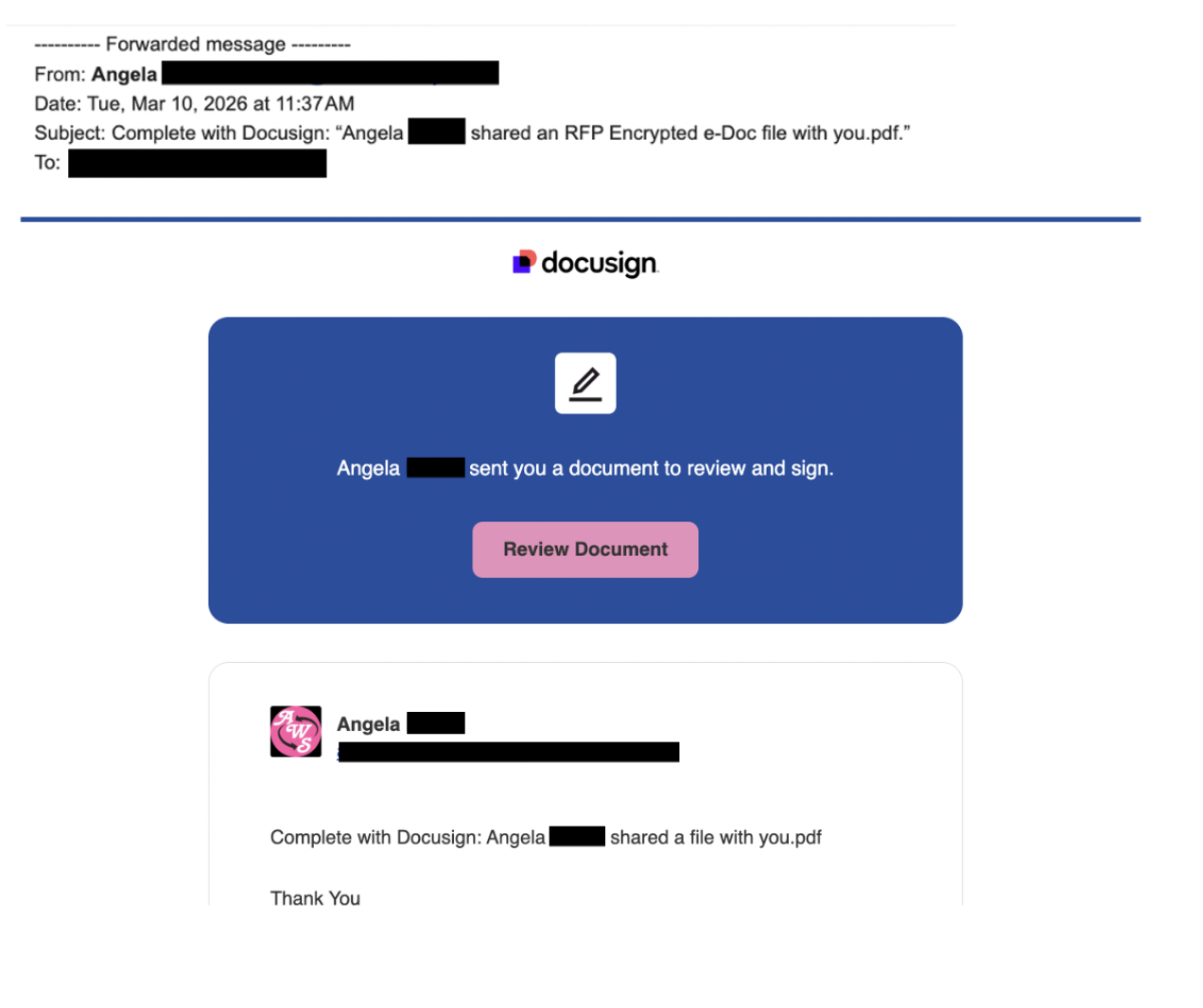
The phishing email — The email that landed in our CEO's inbox. Passed every spam and security filter without a single flag.
His EA caught it — only because she knew he wasn't expecting any documents that week. Curious, they decided to investigate. Even going in knowing it was suspicious, the attack held up at every step.
Here's what they found.
The attacker used a real person's identity
The sender appeared to be a real, named professional at a legitimate organization — the kind of person whose contact details are publicly listed on a company website. The attacker almost certainly scraped that information to add credibility. The actual person had nothing to do with it. Their identity was borrowed without their knowledge, which is worth sitting with for a moment: the people whose names appear on these emails are victims too.
This is increasingly common. DocuSign phishing campaigns frequently use real names, real companies, and sometimes even compromised legitimate email accounts to send the attack. The goal is to make the sender feel familiar and trustworthy. It works.
Why DocuSign specifically
DocuSign is used by over a billion people worldwide. It handles contracts, business agreements, legal documents, and financial paperwork. That combination — massive reach and high-value context — makes it the perfect vehicle for attackers.
When you receive a DocuSign request, your instinct is to act. Someone needs a signature. There's a document waiting. The psychology of the platform works against you — it's designed to create a sense of pending action, and attackers exploit that expectation precisely.
There are three things attackers are typically after with these scams: your email or SSO credentials for platforms like Microsoft 365 or Google Workspace, access to install malware on your device, or enough trust to get a finance team member to approve a fraudulent invoice. All three have serious consequences. Stolen credentials in particular don't just compromise one account — they become the entry point for everything else connected to that login.
We know of a business whose email system was fully compromised after someone on their team fell for a variant of this exact attack. The initial click led to stolen credentials, which led to a compromised inbox, which led to attackers monitoring internal communications and waiting for the right moment to redirect a payment. That's how these things escalate.
What clicking actually leads to
When our team clicked the "Review Document" button in a controlled investigation, it didn't go to DocuSign.
It went to a page hosted on Amazon Web Services — a legitimate cloud platform — with the URL: sign-docu.s3.us-east-1.amazonaws.com. The page said "Document Notification" at the top, used DocuSign-style blue branding, and asked for a work or business email address to "securely access your document." At the bottom it said "Need help? Reach out to Dropbox Support."
DocuSign. AWS. Dropbox. Three different brands in one attack, and most people wouldn't notice the inconsistency because by the time you're on that page, your guard is already down.
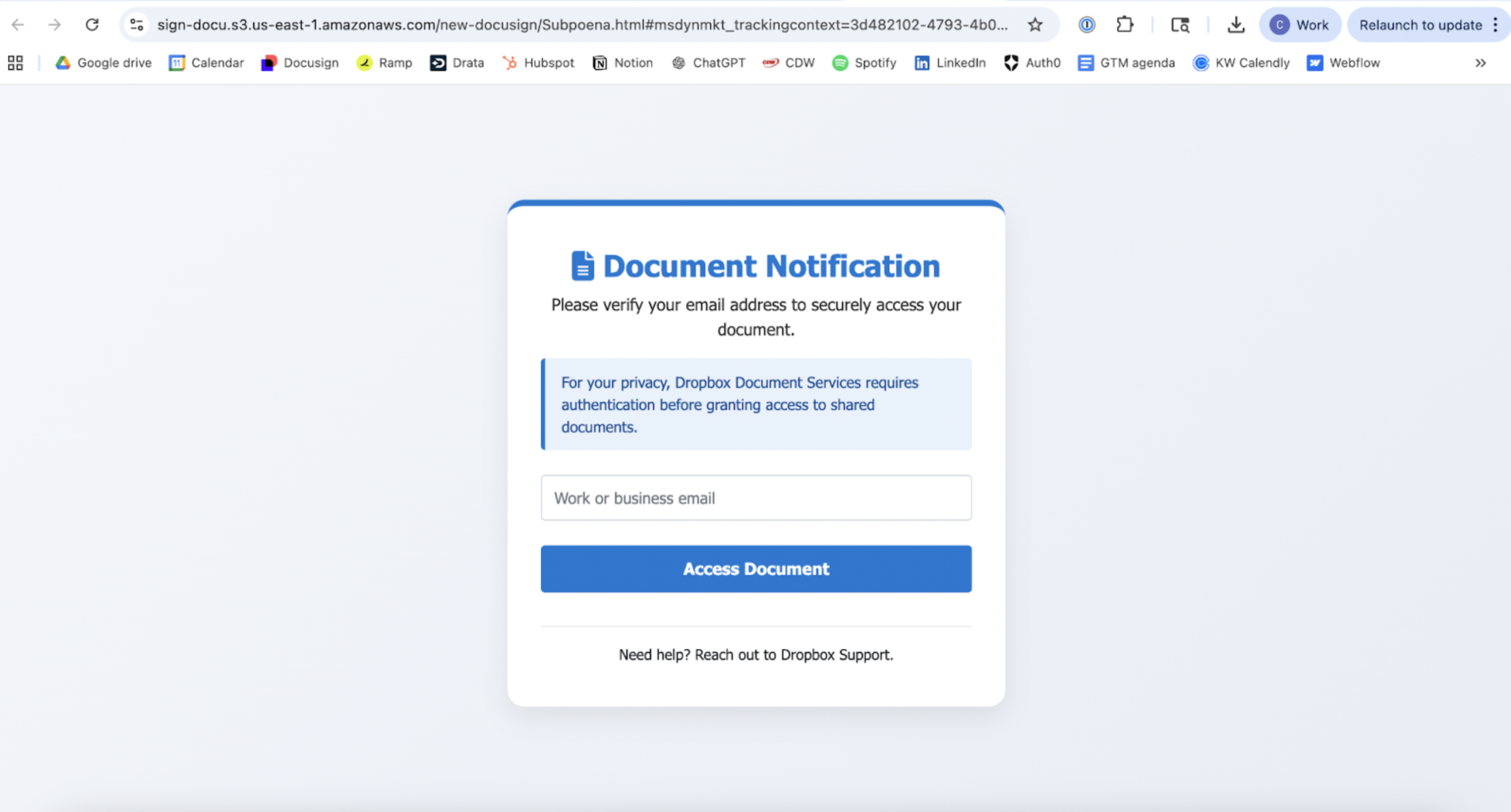
The credential harvesting page - The page the 'Review Document' button actually leads to. Hosted on Amazon's infrastructure. Note it says Dropbox, not DocuSign.
DocuSign does not ask you to verify your email before accessing a document. That step doesn't exist in their legitimate flow. If you see it, you're on a fake page.
Why the attacker used AWS
This is the part worth understanding as a business owner, because it explains why standard security tools miss this.
The page wasn't hosted on some suspicious domain registered last week. It was hosted on Amazon's own infrastructure — a real AWS S3 bucket with a legitimate Amazon URL. Every signature-based security tool on the market works by checking sites against databases of known threats. A page hosted on Amazon's servers, with no prior history of malicious activity, passes every check. There's nothing in any database that says this URL is dangerous, because it's technically Amazon's URL.
This is an increasingly common tactic. Attackers are deliberately hosting credential harvesting pages on legitimate cloud platforms — AWS, Google Cloud, Microsoft Azure, Webflow — specifically because they know it defeats the tools businesses rely on.
The security tool that missed it
To confirm what we suspected, we checked the page against Bitdefender TrafficLight, a browser security extension used by businesses for web protection.
The result: "This page is safe. We did not find any suspicious elements on this page."
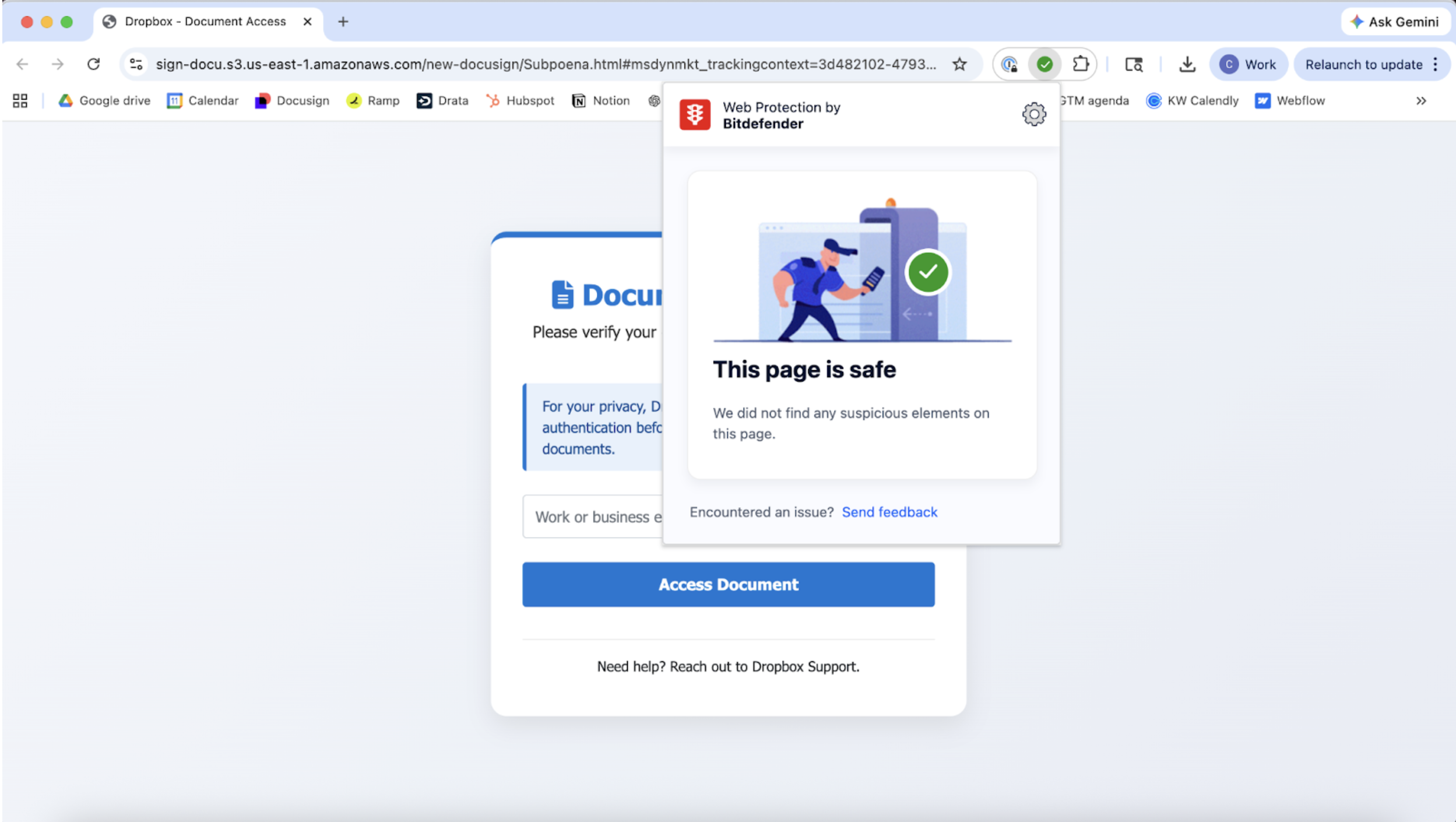
Bitdefender TrafficLight showing green on the fraudulent page — Bitdefender TrafficLight on the credential harvesting page: 'This page is safe.'"
To be clear about why this happened: Bitdefender TrafficLight is a legitimate tool built on a legitimate approach. It checks sites against known threat databases. The page we visited was hosted on Amazon's infrastructure with no threat history. By every metric that tool is built to measure, the page was clean. This isn't a failure of effort — it's a structural limitation of how signature-based security works.
The problem is that "no known threat history" and "safe" are not the same thing. A credential harvesting page that launched this morning has no threat history. It also has your login details the moment you type them. Here's how to tell if a website is actually legit before you enter anything."
How to protect your team
The practical steps matter here, because awareness alone isn't enough when the attacks are this convincing.
Train your team on one specific rule: DocuSign does not ask you to enter your email address or verify your identity before showing you a document. If you see that step, stop immediately and report it. That single tell would have stopped this attack cold. If anyone on your team receives a suspicious DocuSign link, they can paste it into Haven's free link checker before clicking.
Always check the URL before entering anything. The URL bar is the one thing attackers can't fully fake. A legitimate DocuSign page will always be on docusign.com. An AWS domain, a Webflow URL, or anything that isn't docusign.com is a red flag regardless of how the page looks.
Verify unexpected requests through a separate channel. If someone you don't have an active relationship with sends you a document to sign, a thirty second check — searching the sender's organization, calling a known number — is worth more than any security tool.
Add browser-level protection that goes beyond signature matching. The attack described in this post defeated email filters and a dedicated security extension because both rely on known threat databases. A tool that evaluates whether the site you're on is actually what it claims to be — rather than just checking if it's been flagged before — catches what those tools structurally can't. [link to Google post, anchor text: "why signature-based tools have this limitation by design"] [link to antivirus post, anchor text: "why antivirus has the same structural gap"]
The one thing that actually caught it
It wasn't a security tool. It was a person who knew enough context to pause. His EA knew he wasn't expecting a document. That pause — that moment of "this doesn't fit" — is what stopped it.
In a small business, you can't always rely on that. Not everyone has an EA. Not every employee knows what documents their colleagues are expecting. The attacks are specifically designed to arrive at moments when you're busy, distracted, and inclined to act quickly.
The answer isn't to make your team more suspicious of everything. It's to add a layer of protection at the exact point where these attacks land — inside the browser, at the moment you're about to hand something over to a site that may not be what it looks like.
Haven works at the browser level — the place where this attack, and most like it, actually does its damage. It doesn't replace your existing tools. It covers the gap they can't see. Download Haven free from the Chrome Web Store.

